…think about what you want to do, what you really want to do, in the coming new year. About what you want to change in your life. Don’t say “I’ll try it” – say “I’ll do it”.
But if you say…
I will stop smoking…
I will stop insulting my neighbor…
I will stop speaking blasphemy…
I will stop drinking too much…
You know, this will never happen.
Go out of yourself and give for the homeless, give for the research against cancer, against leucemia…go and take a godfathership for a child in Asia, Africa, South America….
…..go and spend the half of money of last year in fireworks….and next year the half of this year…
soure: http://boxset.ru/and-then-5-minutes-before-midnight/
thanks

Knowledge base!
Tuesday, March 29, 2011

Sunday, March 13, 2011
CHẢY ĐI SÔNG ƠI
Ơi con sông hiền hòa, chở đầy nước ngọt phù sa
Ơi con sông thiết tha, ấp ôm bến bờ xứ sở
Sông mấy ngàn năm tuổi, miệt mài chảy mãi khôn nguôi
Chuyện bao đời sông biết cả
Mà sao vẫn trẻ mãi không già
Chảy đi sông ơi, chảy đi sông ơi
Ơi con sông trôi suốt muôn đời
Hãy cho ta gửi lời thương nhớ
Nhắn giùm ta về nơi góc biển
Rằng phía đầu nguồn ta vẫn ngóng trông
Chảy đi sông ơi, chảy đi sông ơi
Ơi con sông tiêng hát muôn đời
Hãy cho ta nói lời cay đắng
Nhắn về ai ở nơi góc biển
Rằng nỗi muộn sầu đang ngày đêm chan chứa
Ơ....
Ơi con sông hiền hòa, dịu dàng an ủi lòng ta
Ơi con sông thiết tha, chứa chan chung tình sâu nặng
Sông vỗ về đôi bờ, thì thầm ngày tháng khôn nguôi
Sông hiến mình tất cả, đời sông không hề tiếc với đầy
Chảy đi sông ơi, chảy đi sông ơi
Ơi con sông trôi suốt muôn đời
Hãy cho ta gửi lời thương nhớ
Nhắn giùm ta về nơi góc biển
Rằng phía đầu nguồn ta vẫn ngóng trông
Chảy đi sông ơi, chảy đi sông ơi
Ơi con sông tiêng hát muôn đời
Hãy cho ta nói lời cay đắng
Nhắn về ai ở nơi góc biển
Rằng nỗi muộn sầu đang ngày đêm chan chứa
Này đây những chiếc lá ta thả trôi sông
Hãy mang theo nỗi lòng ta xuôi theo dòng
Này đây những chiêc lá như nụ hôn ta
Hay trôi đi trôi về nơi xa ấy
Chảy đi sông ơi, chảy đi kìa sông ơi.
Thursday, March 10, 2011
March 2011 Microsoft Super Tuesday
February has a fairly heft drop. It includes fixes for a number of publicly disclosed vulnerabilities that have public exploits. Following is a look at the bulletins that address these issues.
* MS11-003: Cumulative Security Update for Internet Explorer
Two of the four vulnerabilities patched in Internet Explorer were publicly released. CVE-2010-3971 covers a vulnerability in multiple recursive import statements within a CSS file. This use after free bug can lead to remote code execution and has public exploits readily available. IBM customers have had protection available in the previously released CSS_Import_Corruption signature. The other vulnerability listed as publicly disclosed is CVE-2011-0038. This is a dll hijacking vulnerability in IE 8 when opening .html files. The two privately disclosed vulnerabilities are both critical memory corruption vulnerabilities that can lead to remote code execution.
* MS11-004: IIS FTP Service Heap Buffer Overrun Vulnerability
The IIS FTP service has a publicly disclosed vulnerability in the handling of IAC commands. Due to the limited control an attacker could exert on the data written past the heap buffer, this vulnerability was initially classified as a denial of service. Subsequent research showed that even with limited control an attacker could potentially gain remote code execution. The known public exploits at the time of this writing are denial of services against the FTP service. IBM customers have had protection available from this via the previously released FTP_IIS_IAC_Overflow signature.
* MS11-008: Windows Shell Graphics Processing Overflow Vulnerability
This bulletin covers a vulnerability in the rendering of a malformed thumbnail in meta-data embedded within certain file formats such as Microsoft Word .doc files that can lead to remote code execution. Public exploits of this vulnerability are readily available. The exploit occurs when Windows Explorer attempts to render the malicious file in preview mode. An attacker could attach a malicious file to an email and wait for the victim to browse to it or entice the victim to open a share containing a malicious document. IBM customers have had protection available from this via the previously released CompoundFile_Windows_Thumbnail_Overflow signature. X-Force member Jon Larimer recently blogged about his presentations on this class of vulnerabilities in shell extensions.
Source: http://blogs.iss.net/archive/2011_02_MSFT_Super_T.html
what integrity ...!!
Wednesday, January 5, 2011
2010 in Review: 2010′s Most Dangerous List
As 2010 comes to a close, here's a list of the riskiest items we encountered in the past year:
- Hardware: The riskiest hardware device used in 2010 was the German identification card reader. These cards contain encoded private information such as fingerprints. Unfortunately, the information on them can be quite easily stolen by using certain card readers.
- Website software: The riskiest software used by websites in 2010 was the popular blogging platform WordPress. Tens of thousands of unpatched WordPress blogs were used by cybercriminals for various schemes, primarily as part of redirection chains that led to various malware attacks or other blackhat search engine optimization (SEO)-related schemes.
- IP: The most dangerous IP used in 2010 was Internet Relay Chat (IRC). Thirty percent of all botnets used IRC to communicate with infected machines and their command-and-control (C&C) servers. Fortunately, blocking IRC use in networks reliably stops botnets.
- OS: The riskiest OS used was Apple's Mac OS X. In November, Apple sent users a massive maintenance release that weighed in at at least 644.48MB. The weighty upgrade included fixes for multiple security vulnerabilities since the previous update released in mid-June. Apple's penchant for secrecy and longer patch cycles also increased the risk for users.
- Website: The most dangerous website in the world was Google. Its tremendous popularity led cybercriminals to target it specifically for blackhat SEO-related schemes, which in turn, led users to significant malware threats, particularly FAKEAV. In addition, Google's ad network was also frequently victimized by malvertisements.
- Social network: In another case wherein popularity led to danger, Facebook could be considered the most dangerous social networking site around. Everything from survey scams to KOOBFACE malware proliferation ensued on the site, as cybercriminals went where the people were, that is, Facebook.
- Top-level domain: The most dangerous top-level domain in the world was CO.CC, which allowed cybercriminals to register thousands of domains on the fly with very little in the way of verification. This, along with Russian ISPs that routinely refused to shut down malicious sites, made for a very dangerous combination.
- File format: PDF was the riskiest file format in 2010, as Adobe Acrobat and Reader vulnerabilities routinely became part of exploit toolkits.
- Runtime environment: The most dangerous runtime environment for users in 2010 was Internet Explorer (IE) with scripting enabled. Even today, most browser exploits specifically target IE. However, Java is quickly becoming a more prominent target and could become the prime target in 2011.
- Infection channel: The most common infection channel was still the browser, as more than two-thirds of all infections used this as infection vector. Previous infection methods like flash disks and spammed messages were still around but were less prominent than before.
Source: http://blog.trendmicro.com/2010s-most-dangerous-list/
Thanks!
Saturday, January 1, 2011
Happy New Year!

The New Year is coming,
so let us all rejoice.
Past mistakes long behind us.
Only thing left to do is forget your memories,
as the clock strikes 12.
A new year ahead of us.
It will be full of happy times,
good memories and bad.
There will be regret,
Hope,
Happiness,
Premonition,
Depression,
Paranoia and Confusion.
But these won’t last.
The Seasons will fly past.
Spring,
Summer,
Fall.
Ending with Winter.
Then another New Year will begin.
A year goes by,
Full of so many experiences.
But it fly’s so fast,
Before you know it the New year is old.
And it’s time for 2011.
THANKS!
Tuesday, December 28, 2010
Calm down!

Cứ bình tĩnh! Bạn đã tập lái xe hơi chưa? Còn nhớ buổi đầu ra sao chứ? Mình cứng đơ ngồi trên chiếc nệm, nắm chặt lấy tay bánh; bạn chăm chú nghĩ tới cử động sắp làm, loay hoay tới nỗi máy kẹt, không chạy được nữa. Tại sao thần kinh bạn căng thẳng như vậy? Tại bạn không vững bụng, sợ có một cử động nào vụng về trước mặt người dạy lái xe. Nếu người này thông minh thì tức đã bảo bạn: "Cứ ngồi cho thoải mái, đừng nắm chặt cái tay bánh, cứ bình tĩnh thở, với lại tôi ngồi bên cạnh mà ngại cái gì?" Nhiều người cũng mắm môi mắm lợi lái cuộc đời họ như bạn lái xe hơi hồi đó. Tại sao? Tại sao họ sợ. Sợ những nỗi khó khăn nó xảy ra hoài (phần nhiều là bất thần), sợ lầm lẫn, sợ thất bại. Họ có tham vọng muốn làm cái gì cũng hoàn hảo, mà chỉ tin ở sức mình thôi. Họ không chịu tự nhận là kẻ tập sự, học nghề, nên không tự phó thác cho một "hướng dẫn viên". Tinh thần họ căng thẳng, môi họ mím lại, mắt họ ngó trừng trừng, tư thế họ cứng đơ, cử chỉ họ vụng về. Những kẻ khốn khổ đó hầu hết là nạn nhân một nền giáo dục gia đình lầm lẫn: ngay từ hồi nhỏ, cha mẹ họ đã nhồi vào óc họ rằng hễ có nghị lực là làm được những việc oanh liệt, mà quên không dạy cho họ điều cốt yếu này: biết tin cậy vào "hướng dẫn viên". Nhưng hướng dẫn viên đó là ai? Ở gần Bắc Cực và Nam Cực, có những tảng băng lớn vô cùng, nổi lềnh bềnh trên biển, người ta gọi là băng đảo (iceberg). Những tảng băng đó chỉ có một phần nhỏ nổi trên mặt nước, còn phần lớn chìm ở dưới. Con người cũng vậy, có một phần ý thức hiện ra ngoài và một phần vô thức không hiện ra: tôi gọi phần trên là hiện thức, phần dưới là tiềm thức. Cái "ngã" tự ti, cái "ngã" hiện thức chỉ là một phần nhỏ của toàn thể cái "ngã". So sánh cái "ngã" của ta với một cây thì phần hiện thức của cây, cành và lá còn phần tiềm thức là rễ ăn sâu ở dưới đất. Chính phần tiềm thức này chứa và phân phối các sinh lực của ta. Chính nó phát ra cái mà ta gọi là bản năng, trực giác, năng lực sáng tạo; ta nằm mộng, linh cảm, tiên tri được cũng là nhờ nó. Nó sáng suốt hơn phần hiện thức của chúng ta. Trên đường đời ta tiến dễ dàng hơn, nếu ta tin cậy nó mà đừng day tay mắm miệng bắt ý chí của ta gắng sức quá mức (...) Các y sĩ, các nhà trị bệnh bằng tâm lí và các mục sư thường thấy các bệnh nhân hoặc tín đồ phàn nàn và hỏi như vầy: "Tôi đã gắng sức làm mà không có kết quả, tôi tuyệt vọng rồi. Biết làm sao bây giờ?". Và luôn luôn các vị đó đáp lại đại ý như sau: "Đừng làm gì nữa". Như vậy không có nghĩa là phải an phận, buông xuôi, mà có nghĩa là cứ tiếp tục chiến đấu bằng cách ngược hẳn lại, đừng lo lắng, co rút lại nữa, mà cứ bình thản cho gân cốt dãn ra. Nói cách khác là đừng bắt trí óc, nghị lực phải căng thẳng mà cứ hoàn toàn tin cậy ở "hướng dẫn viên" của mình và tin ở tiềm thức của mình. Mới rồi tôi nằm mơ thấy mình sắp chết, đương hoảng hốt, thì bỗng nghe thấy có ai bảo: "Cứ thản nhiên, đừng lo sợ". Tôi nghe lời và thấy mình như ở trên một con tàu lênh đênh trên làn nước phẳng lặng của một con sông rộng, trôi tới những miền tối tăm, bí mật, mà không sợ sệt, không đau đớn, êm như ru. Hễ nằm mơ thấy chết thì luôn luôn là một dấu hiệu sắp có sự thay đổi. Cái tiềm thức của tôi lần đó đã khuyên tôi cứ tin ở một sức mạnh lớn hơn, để mặc nó chỉ huy đời tôi. Làm một công việc gì, tới khi thấy bí, gắng sức hoài mà không có lối thoát, thì tôi bỏ ngay công việc đó mà làm công việc khác cho tới hết ngày. Sáng hôm sau, sự khó khăn hôm trước tự nó giải quyết xong vì trong khi cái hiện thức của tôi ngủ thì cái tiềm thức của tôi vẫn tiếp tục làm việc. Trong đời tôi, mỗi lần gặp một vấn đề đặc biệt gai góc nào, tôi cũng dùng phương pháp đó (tôi phải thú thực rằng tôi phải khó nhọc mới tập áp dụng nó được): sau một thời gian suy nghĩ, tôi quyết tâm bỏ mặc nó, không thắc mắc về nó nữa. Như vậy không có nghĩa rằng tôi "xô lùi" vấn đề lại, để có ảo tưởng rằng mọi sự đã được giải quyết thỏa đáng; trái lại tôi nhận ra rằng tôi không thể giải quyết được nó bằng những phương tiện của tôi, và tôi giao vấn đề cho "hướng dẫn viên" của tôi. Thế là tôi được bình tĩnh và đó là bước đầu tiên tiến tới giải pháp được rồi, vì có bình tĩnh thì mới sẵn sàng nhận được sự giúp đỡ của người khác hay của hoàn cảnh. Khi tôi bảo rằng "tiềm thức" có thể giúp đỡ ta được là tôi nói theo tâm lí học. Xét theo một khía cạnh khác thì có thể gọi sức mạnh đó là thần phù hộ cho mình, là Thượng Đế; nhưng Thượng Đế và tiềm thức không hoàn toàn như nhau, (...). Trong đạo Phật, có một phái gọi là Thiền. Không thể giảng cho bạn hiểu trong vài hàng thế nào là thiền được, nhưng tôi xin kể chuyện dưới đây để bạn có một khái niệm về thiền. Trong một cuộc thi bắn cung, một người Âu thấy một bậc thầy trong thiền môn giương một cây cung rất lớn và nặng. Vì quen dùng sức mạnh của bắp thịt, người Âu đó ngạc nhiên rằng nhà tu hành giương cung sao mà dễ dàng thế. Nhà tu hành bảo: "Ông thử nắn bắp thịt ở cánh tay tôi mà xem". Bắp thịt hoàn toàn mềm như thường, cơ hồ không vận dụng tới. Mũi tên nhẹ nhàng phóng ra, bay rất xa mà nhà tu hành không mệt sức chút nào cả. Theo đạo thiền, nghệ thuật bắn cung là nhận định cho đúng cái đích phải nhắm, tưởng tượng trước trong óc rằng mũi tên bay trúng đích, rồi thản nhiên để cho cái sức ở nội tâm giúp cánh tay của mình.
Trích một đoạn trong tác phẩm dịch "Chấp nhận cuộc đời" của cụ Nguyễn Hiến Lê.
Xin cám ơn.
Sunday, December 26, 2010
The Golden Rules of Permissions Administration
The following are what I call the Golden Rules of Permissions Administration. These rules were developed through years of file server administration but generally apply to any application administration like SQL Server, Sharepoint server, Active Directory, etc.
The Golden Rules of Permissions Administration can be thought of as a hierarchy of best practices, the very best practice being the last rule in the list. Each “rule” represents an evolutionary step forward in the way administration is performed. As you gain understanding of the purpose of each rule you will start to appreciate that as each rule is implemented greater and greater flexibility and ease of administration is achieved.
The ultimate goal of these rules and administration in general is to simplify (greatly reduce the amount of time it takes to perform) daily administration of permissions over the long run. However, to achieve this goal there is more initial setup and configuration involved. If you find yourself reading the rules and concerning yourself with the extra work it takes to implement the next rule, then you are thinking about your work in the wrong terms…reactively, while the Golden Rules of Permissions Administration is truly a proactive approach and ultimately a time saver.
The Golden Rules of Permissions Administration
1) Never give “end users” the ability to administer permissions
a. Instead insure that only professional administrators for the application can administer permissions. This will prevent problems in the long run.
2) Never assign permissions to an individual user
a. Instead place the user into a group and assign permissions to the group.
3) Never assign permissions to an individual file (or object).
a. Instead place the file (or object) into a folder (or group, etc) and assign permissions to the folder (or group, etc).
4) Never assign permissions to a “user group”
a. Instead create a specific “resource group” and place the users and/or “user groups” into that “resource group.”
5) Always assign permissions in a Resource Security Model
a. This requires a very high level view of the organization and great understanding of the individual application and needs of the organization.
Rule 1: Never give “end users” the ability to administer permissions.
First lets start be defining what an “end user” is. As it pertains to these rules an “end user” is anyone not willing to and/or not trained to follow all of these Golden Rules of Permissions Administration. That’s a pretty broad spectrum of people. I assume that most people reading this document have an Information Technology (IT) background, so the “end users” could be IT managers, developers or programmers, system administrators, helpdesk, security engineers, SQL server administrators, and other application specific IT professionals, in addition to the more common “end users” of non IT employees. Yes, as it pertains to this rule all these people are considered “end users” if they are not willing, not properly trained, or simply unable to follow (because lack of access to appropriate tools) the Golden Rules of Permissions Administration.
The entire point of defining “end users” is to highlight the importance of properly defining how administration should be done in your environment and not viewing administration as an “anyone can do it” type of job, because no one can do administration equally as well as a professional administrator following these rules.
The other item to note about “end users” that do permission administration is that they will never move beyond rule 2 or 3 of the Golden Rules of Permissions Administration. Therefore, these sub par implementations will forever burden professional administrators that will come in after the fact to fix the issues and problems. The reason for this is not simply because of a lack of skill or a lack of training, it is more likely they will not have access to the higher level administrative tools needed to create and/or access groups needed for rules 4 and 5 to be implemented. Also, even if they had access to these tools, the “end users” view of the company and technology may be so limited that their implementations usually have short comings in the long run.
Rule 2: Never assign permissions to an individual user
So much has been written about this rule that it almost seems pointless to discuss, but yet still poorly trained or lazy administrators will give access to individual users. There is only one instance in which an individual user should be assigned permissions directly to an object, which is when implementing a user home directory. This is the only time it is deemed necessary to assign permissions directly to the user. However, a caveat to this rule is that Rule 1 should also be followed. By not allowing the user to modify rights to their home directory you allow for a more secure environment. This is because when done properly only on administrator will have the ability to modify permissions to gain entry into the user directory, thus maintaining a solid barrier from tampering by other employees or by the individual users themselves.
Rule 3: Never assign permissions to an individual file (or object)
A core theme of the Golden Rules of Permission Administration is that individual objects and users are grouped together and permissions are always assigned by groups of users to groups of objects that require the same permissions. If you assign permissions to individual files or other objects that can be grouped together using folders (or other grouping methods) then you have missed a major opportunity to simplify your administration. The reason your administration will be simplified is because you can simply add files to the folder (or other grouping method) to assign the same permissions in the future to the same files.
Unfortunately, not all items that you can assign permissions to can be grouped. If this is the case then you are left with no choice but to assign a group of users to the individual item. This is rare and is the exception and not the rule. But you should always assign permissions to a grouping object and not the individual object when possible.
Rule 4: Never assign permissions to a “User Group”
To simplify this explanation we will use the following definition of a “User Group”. A “User Group” is a group created with members based on the idea that the users have something in common other than a resource to which they are being given access to. These are things that users will always have in common, and are things that other users clearly lack. These groups should always be strictly enforced to maintain the integrity of the group. Examples are: Departmental groups, location groups, and role groups like SQL DBA, or security admin, etc. Users that are clearly not members of these organizational structures should not be placed in these groups. Users are typically grouped in this manner. However, administrators make two common mistakes implementing these types of groups.
The biggest mistake administrators make in implementing these types of groups is using these groups to apply permissions directly to one or more individual objects, folders, etc. This action makes support and access of these resources more difficult to administer over time.
The second mistake is not adhering to a strict policy of keeping these groups made of members that clearly meet the defined organizational (departments, locations, etc) and role requirements (DBA, security admin, etc). When administrators place users into these groups because it is convenient they tend to unknowingly give access to other resources. This can lead to unauthorized access and other issues.
Properties of a User Group Security Model
1) Users are assigned directly to groups that are then directly assigned to resources
2) More than one group per access type (Read and Write, Read Only, Full Control, etc) is assigned to resources
Below is a very common example of a user group security model that you will find at many companies. Notice how a single group is directly assigned permissions to various folders. This is type of implementation is not recommended because it is more difficult to support.

For example assume an existing user, James is already in the “IT Users” group but now needs Read and Write (RW) access to Folder1 but no access to Folder2. In this scenario, there is no choice but to create a new group and assign that group to the Folder1 with RW access, then place James into the newly created group. You could assign James directly to Folder1 but that is a violation of previous rules. You could add James to HR Users but that would grant James access to Folder2 as well as other permissions not shown in the picture. All of these workarounds and can be avoided and simplified administration can be achieved by gaining an understanding of the next rule.
Rule 5: Always assign permissions in a Resource Security Model
The Resource Security Model is a multiple tier security model that is both flexible and easy to administer. The general types of objects used in a Resource Security Model are: Users objects, Organizational Groups (grouped by departments, locations, regions, etc), Role Groups (DBA, Security Admin, Helpdesk, etc), and Resource Groups.
Because of its flexibility the basic implementation of a Resource Security Model can be either two tier, three tier, or four tier. More tiers are normally implemented within the Organizational Groups because they easily lend themselves to group nesting. But for the purpose of this discussion the Organizational Groups are considered a single tier. All forms of this model can be used in a single environment allowing the greatest flexibility and ease of implementation.
Below is a diagram showing how these objects related to each other to create the Resource Security Model.
 Descriptions of the different types of a Resource Security Model
* Two tier model: Resource groups are used to secure the object per access type, users are then placed directly into the Resource group.
* Three tier model:
- Type A: Resource groups are used to secure the object per access type, Role based groups are used to create a role with specific permissions via placement into different Resource groups. Users are place directly into each Role group.
- Type B: Resource groups are used to secure the object per access type, Organizational groups are then placed into the appropriate Resource group as appropriate for that department, location, etc. The users that are members of the Organizational group are automatically given access to the specified resources.
* Four tier model: Resource groups are used to secure the object per access type. Role based groups are used to create a role with specific permissions via placement into different Resource groups. Organizational groups are then placed into the appropriate Resource group as appropriate for that department, location, etc. The users that are members of the Organizational group are automatically given access to the specified resources.
In general using the Resource Security Model will result in the most flexible and easy to administrate security model your company can implement.
Properties of a Resource Security Model
1) Only one group per access type is assigned to the resources.
a. For example separate resource groups are created to secure a folder with Read Only (RO) and Read Write (RW) permissions.
b. Example names:
i. Foldername.RO
ii. Foldername.RW
2) Role Groups are used to place users into multiple Resource groups to create a specific “role” allowing multiple permissions to be given out with a single group if needed.
3) Organizational Groups are used to group users based on the organizational requirements of the company. These are an important requirement to help grant access quickly to users based on any of the following common organizational needed.
a. Department
b. Unit (a subset of a department)
i. For example Accounting may payroll, and accounts payable as a Unit of the Accounting Department.
c. Location
d. Region (a collection of locations)
e. Department by Location
f. Unit by Location
g. Department by Region
h. Unit by Region
If we go back to the previous permissions example given for James in Rule 4 and instead implement a Resource Security Model the solution would look like this:

At the very beginning of this article I warned readers that the Golden Rules of Permissions Administration was a proactive approach that had a small cost, more initial setup and implementation time. That cost ultimately saves a lot more administration time post implementation because most changes are just a matter of adding users to groups versus redesigning and re-implementing security post implementation.
Summary
In most companies implementing the Golden Rules of Permission Administration and ultimately a Resource Security Model is not something that is done over night. It will take years of continual effort to replace the old security model with the new proper implementation. However, it can be done. All that is required is a single administrator that continually follows these rules when implementing new security, replaces the old security as needed, and makes the effort every day to follow these rules. Eventually, other administrators will also learn this method and your environment will become easier to administer.
I have personally setup and implemented this very model at several different companies with great success.
Definitions
The Long Run: This is a long term view of how a company or the technology that a company uses may change over time. For instance, acquisitions and divestitures, departmental restructuring, technology upgrades, technology abandonment, and new technology implementations. All of these things professional administrators encounter year after year, and administrators that follow the Golden Rules of Permissions Administration will make each one of these a less painful experience.
Simplify Administration: is easily talked about but rarely properly verbalized. As far as it applies to the Golden Rules of Permission Administration it is a practice of using a flexible Resource Security Model and a centralized administration console to assign permissions to all applications in the enterprise using methods that increase the efficiency of post implementation administration. Another key feature that a simplified administration model uses is a view that the ease of post implementation administration is more important than initial implementation time.
The last feature that is important to simplifying administration is the ability to have a highly trained engineer setup the initial security configuration and then have lower level administrators place the users into the groups as the need arises over time. This adds to the simplicity of administration by having a centralized administration console (like Active Directory) to provide permissions administration for all applications in the enterprise.
User Group: is a group created with members based on the idea that the users have something in common other than a resource to which they are being given access to. Typically theses groups can have names like “HR Department”, “Accounting Department”, “Managers”, “Domain Users”, “Domain Admins”, etc. It is important to note that these groups tend to fall into one of two types: Organizational Group or Role Group.
Organizational Group: is a group created with members based purely on the organizational structure of the company. These are usually considered a foundational level group for granting access to resources within the company. Users must be a member of the respective departments to be a member of these groups.
Role Group: is a group created to facilitate special types of access that may cross organizational boundaries. This type of group is very beneficial in allowing users from different department’s access to multiple resources quickly and easily.
Resource Group: is a group created specifically for a single resource and a specific access type. For example, granting access to a specific folder with Read/Write access.
Source: http://networkadminkb.com/Shared%20Documents/The%20Golden%20Rules%20of%20Permissions%20Administration.aspx
thanks!
The Golden Rules of Permissions Administration can be thought of as a hierarchy of best practices, the very best practice being the last rule in the list. Each “rule” represents an evolutionary step forward in the way administration is performed. As you gain understanding of the purpose of each rule you will start to appreciate that as each rule is implemented greater and greater flexibility and ease of administration is achieved.
The ultimate goal of these rules and administration in general is to simplify (greatly reduce the amount of time it takes to perform) daily administration of permissions over the long run. However, to achieve this goal there is more initial setup and configuration involved. If you find yourself reading the rules and concerning yourself with the extra work it takes to implement the next rule, then you are thinking about your work in the wrong terms…reactively, while the Golden Rules of Permissions Administration is truly a proactive approach and ultimately a time saver.
The Golden Rules of Permissions Administration
1) Never give “end users” the ability to administer permissions
a. Instead insure that only professional administrators for the application can administer permissions. This will prevent problems in the long run.
2) Never assign permissions to an individual user
a. Instead place the user into a group and assign permissions to the group.
3) Never assign permissions to an individual file (or object).
a. Instead place the file (or object) into a folder (or group, etc) and assign permissions to the folder (or group, etc).
4) Never assign permissions to a “user group”
a. Instead create a specific “resource group” and place the users and/or “user groups” into that “resource group.”
5) Always assign permissions in a Resource Security Model
a. This requires a very high level view of the organization and great understanding of the individual application and needs of the organization.
Rule 1: Never give “end users” the ability to administer permissions.
First lets start be defining what an “end user” is. As it pertains to these rules an “end user” is anyone not willing to and/or not trained to follow all of these Golden Rules of Permissions Administration. That’s a pretty broad spectrum of people. I assume that most people reading this document have an Information Technology (IT) background, so the “end users” could be IT managers, developers or programmers, system administrators, helpdesk, security engineers, SQL server administrators, and other application specific IT professionals, in addition to the more common “end users” of non IT employees. Yes, as it pertains to this rule all these people are considered “end users” if they are not willing, not properly trained, or simply unable to follow (because lack of access to appropriate tools) the Golden Rules of Permissions Administration.
The entire point of defining “end users” is to highlight the importance of properly defining how administration should be done in your environment and not viewing administration as an “anyone can do it” type of job, because no one can do administration equally as well as a professional administrator following these rules.
The other item to note about “end users” that do permission administration is that they will never move beyond rule 2 or 3 of the Golden Rules of Permissions Administration. Therefore, these sub par implementations will forever burden professional administrators that will come in after the fact to fix the issues and problems. The reason for this is not simply because of a lack of skill or a lack of training, it is more likely they will not have access to the higher level administrative tools needed to create and/or access groups needed for rules 4 and 5 to be implemented. Also, even if they had access to these tools, the “end users” view of the company and technology may be so limited that their implementations usually have short comings in the long run.
Rule 2: Never assign permissions to an individual user
So much has been written about this rule that it almost seems pointless to discuss, but yet still poorly trained or lazy administrators will give access to individual users. There is only one instance in which an individual user should be assigned permissions directly to an object, which is when implementing a user home directory. This is the only time it is deemed necessary to assign permissions directly to the user. However, a caveat to this rule is that Rule 1 should also be followed. By not allowing the user to modify rights to their home directory you allow for a more secure environment. This is because when done properly only on administrator will have the ability to modify permissions to gain entry into the user directory, thus maintaining a solid barrier from tampering by other employees or by the individual users themselves.
Rule 3: Never assign permissions to an individual file (or object)
A core theme of the Golden Rules of Permission Administration is that individual objects and users are grouped together and permissions are always assigned by groups of users to groups of objects that require the same permissions. If you assign permissions to individual files or other objects that can be grouped together using folders (or other grouping methods) then you have missed a major opportunity to simplify your administration. The reason your administration will be simplified is because you can simply add files to the folder (or other grouping method) to assign the same permissions in the future to the same files.
Unfortunately, not all items that you can assign permissions to can be grouped. If this is the case then you are left with no choice but to assign a group of users to the individual item. This is rare and is the exception and not the rule. But you should always assign permissions to a grouping object and not the individual object when possible.
Rule 4: Never assign permissions to a “User Group”
To simplify this explanation we will use the following definition of a “User Group”. A “User Group” is a group created with members based on the idea that the users have something in common other than a resource to which they are being given access to. These are things that users will always have in common, and are things that other users clearly lack. These groups should always be strictly enforced to maintain the integrity of the group. Examples are: Departmental groups, location groups, and role groups like SQL DBA, or security admin, etc. Users that are clearly not members of these organizational structures should not be placed in these groups. Users are typically grouped in this manner. However, administrators make two common mistakes implementing these types of groups.
The biggest mistake administrators make in implementing these types of groups is using these groups to apply permissions directly to one or more individual objects, folders, etc. This action makes support and access of these resources more difficult to administer over time.
The second mistake is not adhering to a strict policy of keeping these groups made of members that clearly meet the defined organizational (departments, locations, etc) and role requirements (DBA, security admin, etc). When administrators place users into these groups because it is convenient they tend to unknowingly give access to other resources. This can lead to unauthorized access and other issues.
Properties of a User Group Security Model
1) Users are assigned directly to groups that are then directly assigned to resources
2) More than one group per access type (Read and Write, Read Only, Full Control, etc) is assigned to resources
Below is a very common example of a user group security model that you will find at many companies. Notice how a single group is directly assigned permissions to various folders. This is type of implementation is not recommended because it is more difficult to support.
For example assume an existing user, James is already in the “IT Users” group but now needs Read and Write (RW) access to Folder1 but no access to Folder2. In this scenario, there is no choice but to create a new group and assign that group to the Folder1 with RW access, then place James into the newly created group. You could assign James directly to Folder1 but that is a violation of previous rules. You could add James to HR Users but that would grant James access to Folder2 as well as other permissions not shown in the picture. All of these workarounds and can be avoided and simplified administration can be achieved by gaining an understanding of the next rule.
Rule 5: Always assign permissions in a Resource Security Model
The Resource Security Model is a multiple tier security model that is both flexible and easy to administer. The general types of objects used in a Resource Security Model are: Users objects, Organizational Groups (grouped by departments, locations, regions, etc), Role Groups (DBA, Security Admin, Helpdesk, etc), and Resource Groups.
Because of its flexibility the basic implementation of a Resource Security Model can be either two tier, three tier, or four tier. More tiers are normally implemented within the Organizational Groups because they easily lend themselves to group nesting. But for the purpose of this discussion the Organizational Groups are considered a single tier. All forms of this model can be used in a single environment allowing the greatest flexibility and ease of implementation.
Below is a diagram showing how these objects related to each other to create the Resource Security Model.

* Two tier model: Resource groups are used to secure the object per access type, users are then placed directly into the Resource group.
* Three tier model:
- Type A: Resource groups are used to secure the object per access type, Role based groups are used to create a role with specific permissions via placement into different Resource groups. Users are place directly into each Role group.
- Type B: Resource groups are used to secure the object per access type, Organizational groups are then placed into the appropriate Resource group as appropriate for that department, location, etc. The users that are members of the Organizational group are automatically given access to the specified resources.
* Four tier model: Resource groups are used to secure the object per access type. Role based groups are used to create a role with specific permissions via placement into different Resource groups. Organizational groups are then placed into the appropriate Resource group as appropriate for that department, location, etc. The users that are members of the Organizational group are automatically given access to the specified resources.
In general using the Resource Security Model will result in the most flexible and easy to administrate security model your company can implement.
Properties of a Resource Security Model
1) Only one group per access type is assigned to the resources.
a. For example separate resource groups are created to secure a folder with Read Only (RO) and Read Write (RW) permissions.
b. Example names:
i. Foldername.RO
ii. Foldername.RW
2) Role Groups are used to place users into multiple Resource groups to create a specific “role” allowing multiple permissions to be given out with a single group if needed.
3) Organizational Groups are used to group users based on the organizational requirements of the company. These are an important requirement to help grant access quickly to users based on any of the following common organizational needed.
a. Department
b. Unit (a subset of a department)
i. For example Accounting may payroll, and accounts payable as a Unit of the Accounting Department.
c. Location
d. Region (a collection of locations)
e. Department by Location
f. Unit by Location
g. Department by Region
h. Unit by Region
If we go back to the previous permissions example given for James in Rule 4 and instead implement a Resource Security Model the solution would look like this:
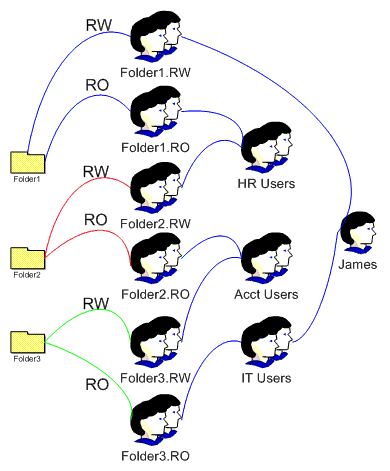
At the very beginning of this article I warned readers that the Golden Rules of Permissions Administration was a proactive approach that had a small cost, more initial setup and implementation time. That cost ultimately saves a lot more administration time post implementation because most changes are just a matter of adding users to groups versus redesigning and re-implementing security post implementation.
Summary
In most companies implementing the Golden Rules of Permission Administration and ultimately a Resource Security Model is not something that is done over night. It will take years of continual effort to replace the old security model with the new proper implementation. However, it can be done. All that is required is a single administrator that continually follows these rules when implementing new security, replaces the old security as needed, and makes the effort every day to follow these rules. Eventually, other administrators will also learn this method and your environment will become easier to administer.
I have personally setup and implemented this very model at several different companies with great success.
Definitions
The Long Run: This is a long term view of how a company or the technology that a company uses may change over time. For instance, acquisitions and divestitures, departmental restructuring, technology upgrades, technology abandonment, and new technology implementations. All of these things professional administrators encounter year after year, and administrators that follow the Golden Rules of Permissions Administration will make each one of these a less painful experience.
Simplify Administration: is easily talked about but rarely properly verbalized. As far as it applies to the Golden Rules of Permission Administration it is a practice of using a flexible Resource Security Model and a centralized administration console to assign permissions to all applications in the enterprise using methods that increase the efficiency of post implementation administration. Another key feature that a simplified administration model uses is a view that the ease of post implementation administration is more important than initial implementation time.
The last feature that is important to simplifying administration is the ability to have a highly trained engineer setup the initial security configuration and then have lower level administrators place the users into the groups as the need arises over time. This adds to the simplicity of administration by having a centralized administration console (like Active Directory) to provide permissions administration for all applications in the enterprise.
User Group: is a group created with members based on the idea that the users have something in common other than a resource to which they are being given access to. Typically theses groups can have names like “HR Department”, “Accounting Department”, “Managers”, “Domain Users”, “Domain Admins”, etc. It is important to note that these groups tend to fall into one of two types: Organizational Group or Role Group.
Organizational Group: is a group created with members based purely on the organizational structure of the company. These are usually considered a foundational level group for granting access to resources within the company. Users must be a member of the respective departments to be a member of these groups.
Role Group: is a group created to facilitate special types of access that may cross organizational boundaries. This type of group is very beneficial in allowing users from different department’s access to multiple resources quickly and easily.
Resource Group: is a group created specifically for a single resource and a specific access type. For example, granting access to a specific folder with Read/Write access.
Source: http://networkadminkb.com/Shared%20Documents/The%20Golden%20Rules%20of%20Permissions%20Administration.aspx
thanks!
Subscribe to:
Posts (Atom)